
08.18.2026 Brittani Yeager
Estimated Reading Time: 6 Minutes
One question that comes up sooner or later in nearly every conversation with a prospective partner is some version of “Can we see it?” Which makes sense. Developers are interested in the integration lift, the technical and security structure, and the Iris identity protection platform’s flexibility. Business and product leaders are curious about the value for the user and how identity & cyber protection can appear in their brand’s digital experience.
It’s a fair question. It’s difficult to pitch a new feature or program to leadership – or hand it off to developers – based on a slide deck alone.
So now you can see it. You can interact with it. And you can even start building your customer-facing identity and cyber protection experience.
Iris OnWatch offers three free demo experiences, allowing you to try our solutions via the Iris API Suite, Iris Micro-Experience, and Iris Portal. These demo experiences let you do things like enroll customers, view sample alerts, customize the interface, and walk through user journeys.
Your business development, product, and technical teams can use these interactive demo resources to explore embedded and standalone web-based identity protection on their own time – before going live.
How You Can Use the Three Iris Demo Experiences To Work For You
Think of these Iris demo experiences as one path with multiple stops.
-
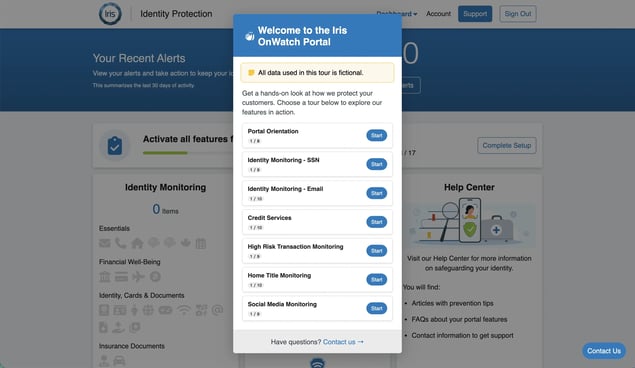
First, the Iris Portal guided tours show you how several solutions are framed in Iris’ own hosted web portal.
-
If you’re looking to embed identity protection, visit the Micro-Experience demo to see how Iris’ identity protection features could be visually represented in your industry-specific digital experience.
-
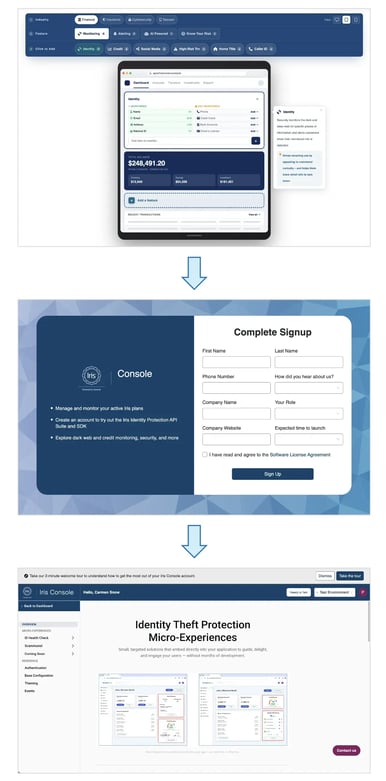
Finally, you and your technical team can set up free Iris Console accounts in order to test, build, and configure the identity protection features you’re interested in integrating within your customer-facing digital environment – whether that means styling a Micro-Experience or building with our APIs.
At any point along the way, feel free to reach out for a consultation and more guidance.
The Iris Portal Guided Tours: Hop In and Explore the Full Experience
The Iris Portal guided tours are free, self-guided walkthroughs of the Iris Portal – our fully hosted, white-labeled identity protection web portal. No sign-up required.
Our guided tours can give you a sense of how we present some of our core features within our own user interface.
We’re constantly studying and investing in the Portal design throughout the year – and we’re proud of the well-thought-out consumer experience it provides.
Whether you are considering integrating Iris-powered features into your product (through Micro-Experiences or the API Suite) or want to offer a customized Iris web portal to your customers, the guided tours can give you a great sense of what a fully realized identity protection experience can be.
Want to see Iris solutions that aren’t currently displayed in the guided tour? Let’s talk, and we can show those to you.
Take the Iris Portal Guided Tours.
The Micro-Experience Demo: See It in Your World
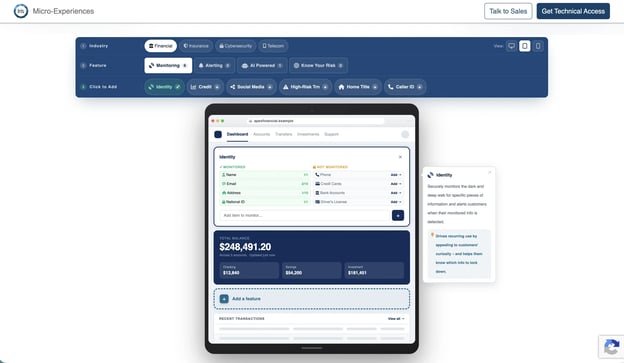
The Iris Micro-Experience demo is a free, interactive tool that lets you build a sample identity protection experience inside a simulated app, in pre-selected industries in desktop, mobile, and tablet views.
Why try out the Iris Micro-Experience interactive demo? Because the biggest question most teams have is, “Would this really feel like our product?”
Now you don’t have to take our word for it. You can see it for yourself – and share the link with your team along with mockups or screenshots.
Here’s what you can do:
-
Select your industry from the preset list, including Financial, Insurance, Cybersecurity, and Telecom.
-
Add different Iris solutions to the layout to see how they could complement your existing features.
-
Switch between phone, tablet, and desktop to see how each component looks on every screen.
The Iris Micro-Experience demo is built for anyone who wants to picture identity protection inside a customer-facing digital environment. So, if you’re a business leader, product owner, or developer, you can get started in one simple click – no signup required.
Wondering when embedding identity protection makes the most sense for your brand? Our Iris Micro-Experience FAQ blog covers the questions we hear most.
Try the Iris Micro-Experience Demo.
The Iris Console: Where Your Technical Team Takes Over
Once you like what you see – whether from the Iris Micro-Experience demo or from our library of Iris solutions – it’s likely time to bring in your technical team.
That’s where the Iris Console comes in.
The Iris Console is free to use. Your technical team simply needs to sign up for an account, and from there, they can take one of two paths.
Configure Your Micro-Experience
After interacting with the Iris Micro-Experience demo, your technical team can create a free Iris Console account, which lets them configure your Micro-Experience with your brand colors, copy, and layout before it goes live.
The best part? After becoming a partner, you can typically launch each available identity protection Micro-Experience in less than a day.
Build with the Iris Identity Protection API Suite
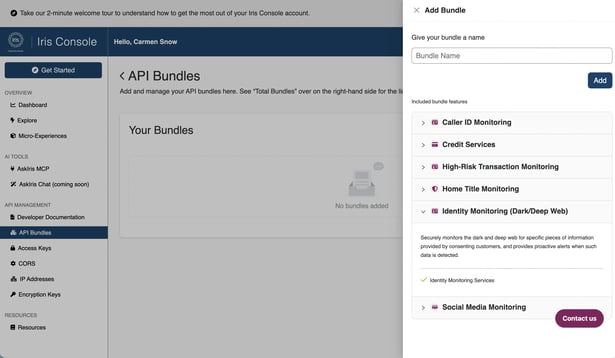
The Iris Console is Iris’ free developer environment, where your technical team can configure Iris Micro-Experiences and explore the Iris Identity Protection API Suite in a sandbox before going live.
Is your brand seeking full control over the customer experience? The Iris Console allows your developers and technical team to explore the API sandbox environment so they can see the data, test integrations, and build – all before going live.
That head start can make a difference. One leading fintech partner went live in under a month using the Iris API Suite, cutting typical implementation time by as much as 70%.
Curious how customer data moves through our identity & cyber protection APIs before you build? Read our breakdown for details: Customer Data Security in Iris’ Identity Protection APIs and SDK.
Create an Iris Console account.
Your Next Step Takes Just a Few Clicks
The Iris Portal guided tours, Iris Micro-Experience demo, and Iris Console are free to use and available now. No need to schedule a phone call with an Iris team member – you can explore them on your own schedule without speaking to someone first.
Here’s one easy way to start: send the Micro-Experience demo and Iris Portal guided tours to your product team and the Iris Console to your developers. Then compile any notes or questions. You’ll then be armed and ready for your first conversation with an Iris team member.
Still weighing which delivery method fits your brand and customer experience needs? Our guide to Choosing Between Iris APIs, Portal, or Micro-Experiences is a great place to start.